Alright, let’s talk about getting your awesome applications seen by the world, or at least by other parts of your cluster. I remember when I first deployed an app to Kubernetes. The pods were running, everything looked green, but then… how do I actually access it? That’s when I bumped into the concept of Services, and let me tell you, it was a game-changer.
Think of a Service in Kubernetes as the postal service for your applications. Your pods are like individual apartments in a big building, each with its own internal address (IP). But how do you send mail to the “Frontend Service” without knowing which specific apartment (pod) it’s in, especially when apartments (pods) come and go? That’s where Services step in.
Why Do We Even Need Services? (The “Pod Problem”)
My first “Aha!” moment with Services came from realizing the inherent instability of pods:
- Ephemeral IPs: Pods get temporary IPs. If a pod dies and restarts (thanks, ReplicaSet!), it gets a new IP address. You can’t reliably connect to a specific pod IP.
- Load Balancing: When you have multiple replicas of an application (e.g., three frontend pods), you need a way to distribute traffic evenly among them.
- Discovery: Other applications in your cluster need to find your service without hardcoding IPs.
Services solve all these problems by providing a stable, abstract network endpoint to a set of pods.
The Big Three: Understanding Service Types
When you define a Service, you tell Kubernetes how you want to expose your application. There are three main types I’ve used constantly, each with its own purpose:
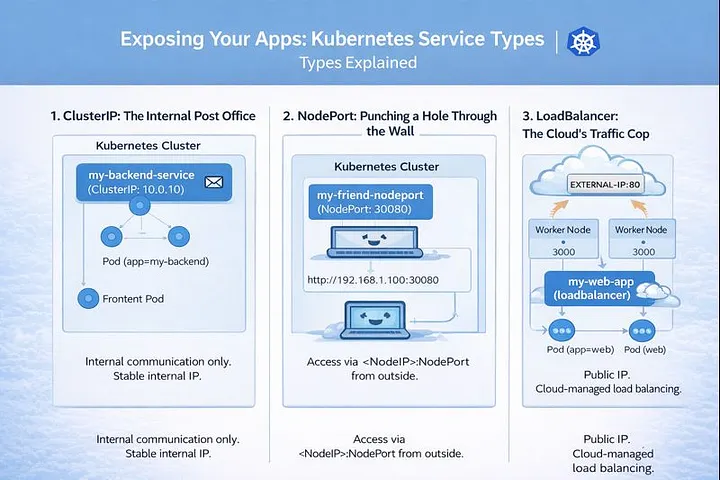
1. ClusterIP: The Internal Post Office
- What it is: This is the default and most common service type. It exposes the Service on an internal IP within the cluster.
- How I used it: This was my go-to for internal microservices communication. My backend pods could talk to my database pods using the database’s ClusterIP service name (e.g.,
my-db-service), and the frontend pods could talk to the backend pods using the backend’s ClusterIP service name. No external access, just clean internal routing.
Use Cases:
- Backend services talking to databases.
- Microservices communicating with each other.
- Any service that doesn’t need to be accessed from outside the cluster.
How it Works: Kubernetes assigns a stable IP address (the ClusterIP) to the Service. When anything inside the cluster tries to access that IP or hostname, Kubernetes’ internal network magic (kube-proxy) routes the request to one of the healthy backend pods managed by the Service.
YAML Example:
apiVersion: v1
kind: Service
metadata:
  name: my-backend-service
spec:
  selector:
    app: my-backend # This selects pods with the label 'app: my-backend'
  ports:
    - protocol: TCP
      port: 80       # Port the Service itself listens on
      targetPort: 8080 # Port the application in the pod is listening on
  type: ClusterIP
2. NodePort: Punching a Hole Through the Wall
- What it is: This type exposes the Service on a static port on each Node’s IP address. It builds on top of ClusterIP.
- How I used it: This was my first step to exposing something directly from outside the cluster, especially in development environments or when I wanted to quickly show a colleague something running. I could just hit
http://<any-node-ip>:<node-port>from my browser. It felt a bit crude, but it worked!
Use Cases:
- Exposing a development or staging application directly for testing.
- When you don’t have a cloud load balancer readily available or don’t want to incur its cost for simple tasks.
- Often used in conjunction with external load balancers that then route to the NodePort.
How it Works: The Service gets a ClusterIP internally (just like a ClusterIP service). Additionally, Kubernetes opens a specific port (the NodePort, usually in the range 30000–32767) on every node in your cluster. Any traffic hitting NodeIP:NodePort is then routed to the Service’s ClusterIP, and finally to a healthy backend pod.
YAML Example:
apiVersion: v1
kind: Service
metadata:
  name: my-frontend-nodeport
spec:
  selector:
    app: my-frontend # This selects pods with the label 'app: my-frontend'
  ports:
    - protocol: TCP
      port: 80       # Port the Service itself listens on (internal to the service)
      targetPort: 8080 # Port the application in the pod is listening on
      nodePort: 30080 # Optional: You can specify a port, or Kubernetes picks one
  type: NodePort
3. LoadBalancer: The Cloud’s Traffic Cop
- What it is: This type exposes the Service externally using a cloud provider’s load balancer. It builds on NodePort.
- How I used it: This became my standard for production deployments where I needed a public IP address and robust load balancing. Whether it was AWS ELB, GCP Load Balancer, or Azure Load Balancer, this service type magically provisioned it for me. I just applied the YAML, and boom, a public IP appeared that handled all the incoming traffic.
Use Cases:
- Exposing public-facing web applications or APIs in a cloud environment.
- When you need a stable, external IP address for your application.
- Leveraging advanced features of cloud load balancers (e.g., SSL termination, sticky sessions, though often configured at the cloud LB level).
How it Works: When you create a type: LoadBalancer Service in a cloud environment (AWS, GCP, Azure, etc.), Kubernetes interacts with your cloud provider’s API. The cloud provider provisions an external load balancer, which then automatically routes external traffic to the NodePorts opened on your cluster’s nodes. This external load balancer usually gets a public IP address.
YAML Example:
apiVersion: v1
kind: Service
metadata:
  name: my-web-app-loadbalancer
spec:
  selector:
    app: my-web-app # This selects pods with the label 'app: my-web-app'
  ports:
    - protocol: TCP
      port: 80       # Port the Load Balancer listens on
      targetPort: 8080 # Port the application in the pod is listening on
  type: LoadBalancer
Final Thoughts on Services
Understanding Services was a crucial step in my Kubernetes journey. They are the backbone of how applications communicate, both internally and externally. While NodePort is great for quick tests, and ClusterIP for internal comms, LoadBalancer is your best friend for getting your production apps out to the public with all the benefits of cloud-native networking.
There’s also Ingress, which provides even more sophisticated HTTP/HTTPS routing. But that, my friends, is a story for another article!
Thank you for reading!
If you found this article helpful, consider following me for more content on Linux, Kubernetes, Observability, DevOps, and Cloud Engineering.
Your support helps me publish more practical, real-world technical guides.