Early in my Kubernetes journey, I faced a strange problem that kept me up at night. My application Pods were scaling perfectly, and my services were reachable. But when I checked my logs, I realized something terrifying: my logging and monitoring agents were completely missing on some nodes.
I had tried to use a standard Deployment, but as the cluster grew, the pods didn’t land where they were needed. That’s when I learned a vital lesson: Not every workload should scale like an application. Some workloads must exist on every single heartbeat of your cluster.
Today, I’m sharing two “superpower” objects that solve this: DaemonSets and Static Pods.
The Scheduling Mindset Shift
Most Kubernetes objects, like Deployments, ask: “How many replicas do I want?” DaemonSets and Static Pods ask a different question: “Where exactly must this Pod run?”
Once I understood that difference — shifting from quantity to placement — everything clicked.
DaemonSet: “The Reliable Shadow”
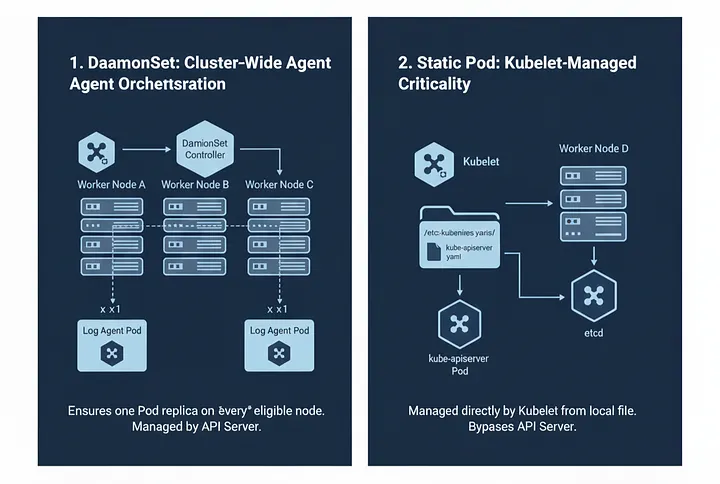
A DaemonSet is your best friend when you need a “shadow” pod running on every node in your cluster.
How it works:
- Automatic Coverage: When a new node joins the cluster, the DaemonSet controller automatically schedules a pod onto it.
- Self-Cleaning: When a node is removed, the pod is gracefully retired.
- Zero Manual Scaling: You never set a replica count. Kubernetes ensures the pod count perfectly matches your node count.
Real-World Scenarios:
- Log Collectors: Fluentd or Fluent Bit gathering logs from every node.
- Monitoring Agents: Prometheus Node Exporter or Datadog agents.
- Security: Intrusions detection systems like Falco.
- Networking: CNI plugins (like Calico or Flannel) that need to manage node-level networking.
A Simple DaemonSet YAML Example:
apiVersion: apps/v1
kind: DaemonSet
metadata:
  name: log-agent
spec:
  selector:
    matchLabels:
      app: log-agent
  template:
    metadata:
      labels:
        app: log-agent
    spec:
      containers:
      - name: fluentbit
        image: fluent/fluent-bit:latest
The “Expert” Shortcut: Creating a DaemonSet in 10 Seconds
Writing a DaemonSet YAML from scratch is tedious. Here is a trick I use to save time by leveraging the deployment command:
- Generate a Deployment template:
kubectl create deployment node-agent --image=busybox --dry-run=client -o yaml > ds.yaml - Quick Edit: Open the file and simply change
kind: Deploymenttokind: DaemonSet. Then, delete thereplicas: 1line. Since DaemonSets don’t use replica counts, leaving it there will throw an error.
Static Pods: The “Ghost” Pods
Static Pods were one of the most confusing topics for me until I saw them in action. Unlike every other pod we talk about, Static Pods completely bypass the Kubernetes API Server.
The Secret Mechanics: Static Pods are managed directly by the Kubelet (the agent running on each node).
- Kubelet watches a specific local directory (usually
/etc/kubernetes/manifests/). - If you drop a YAML file there, Kubelet starts the pod immediately.
- If the pod crashes, Kubelet restarts it.
- If you delete the file, the pod disappears.
Where Static Pods Are Life-Savers The most critical use case is the Kubernetes Control Plane. If you’ve ever wondered, “How can the API Server run as a pod if the API Server is needed to create pods?” — the answer is Static Pods.
Components like the kube-apiserver, kube-scheduler, and etcd usually run as Static Pods. They make Kubernetes self-bootstrapping.
Static Pod YAML Example
apiVersion: v1
kind: Pod
metadata:
  name: static-nginx
spec:
  containers:
  - name: nginx
    image: nginx
Note: To make this work, you must place this file inside
/etc/kubernetes/manifests/static-nginx.yaml on the specific node.
Key Differences: At a Glance
- Management: DaemonSets are managed by the API Server (Cluster-wide); Static Pods are managed by the Kubelet (Node-local).
- Scope: DaemonSets run across all/selected nodes automatically; Static Pods run only on the specific node where the file exists.
- Use Case: Use DaemonSets for Infrastructure Agents; use Static Pods for Control Plane Components.
Final Thoughts
DaemonSets and Static Pods taught me that Kubernetes isn’t just about massive scale; it’s about intent.
If Deployments run your applications, DaemonSets run your infrastructure, and Static Pods keep Kubernetes itself alive. Understanding which tool to grab from the belt is what separates a beginner from an expert.
Thank you for reading!
If you found this article helpful, consider following me for more content on Linux, Kubernetes, Observability, DevOps, and Cloud Engineering.
Your support helps me publish more practical, real-world technical guides.